> For the complete documentation index, see [llms.txt](https://dreamdolls.gitbook.io/help/llms.txt). Markdown versions of documentation pages are available by appending `.md` to page URLs; this page is available as [Markdown](https://dreamdolls.gitbook.io/help/get-started/chat-features.md).
# Chat features
Everything you can do inside a chat, from rating replies to photos, clips and voice calls.
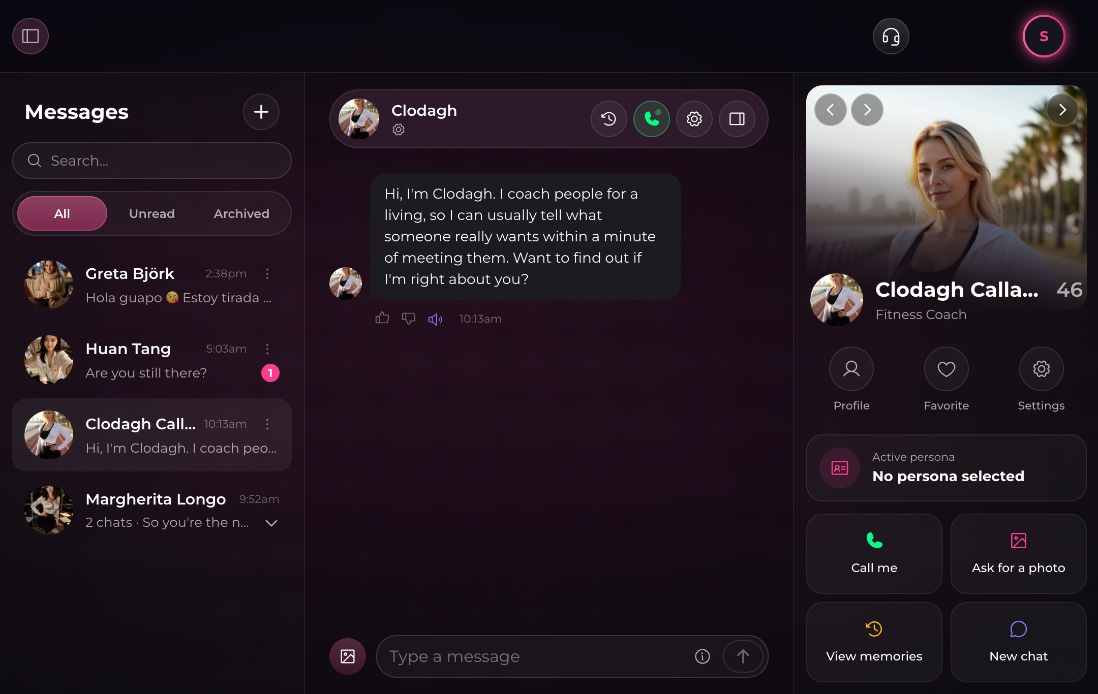
Each chat is a private conversation between you and one companion. Here is what you can do in it.
## Rating replies
Under each of her messages you'll find two thumbs:
* **Good response** tells us she got it right.
* **Bad response** asks **What went wrong?** Pick a reason (for example *Refused me*, *Out of character*, *Wrong language* or *Repetitive*), or skip it.
Ratings help us improve replies for everyone. If her recent replies got a thumbs-down, she also holds back from sending you check-in messages for a while (see [Messages from your companion](/help/get-started/companion-messages.md)).
## Hearing her voice
Click **Read aloud** under a message to hear it in her voice. It's free.
## Photos
There are two ways to get a photo of the moment you're in:
* **Ask for one.** Click the photo button next to the message box, or just ask her in your own words. Each photo costs **2 tokens**.
* **Accept her offer.** Sometimes she offers to send you a picture. You'll see **Accept** and **Decline**; tokens are only charged if you accept.
Photos and clips she sends you also collect in her profile panel, under **Shared media**.
## Turning a photo into a clip
Under a photo, click **Generate clip** to animate it into a short 5-second video. A clip costs **20 tokens**, refunded if it fails.
## Voice calls
Click the phone icon in the chat header to call her. Calls cost **10 tokens per minute** after the first free 15 seconds, and are available once you have bought any token pack. Text chat pauses while you're on a call.
## The chat header
| Button | What it does |
| ----------------- | --------------------------------------------------------------------------------------------------- |
| **Memories** | Shows what she remembers about you. See [Memory](/help/get-started/memory.md). |
| Phone | Starts a [voice call](/help/create/voice-calls.md). |
| **Chat settings** | Spice level, reply style, colors and more. See [Chat settings](/help/get-started/chat-settings.md). |
| Panel | Shows or hides her profile panel. |
Her profile panel has quick actions too: **Call me**, **Ask for a photo**, **View memories** and **New chat**, which starts a fresh conversation with her (see [Multiple chats](/help/get-started/multiple-chats.md)).
## The chat list
* Filter your chats by **All**, **Unread** or **Archived**.
* Search by the chat's name or the companion's name. Search does not look inside messages.
* Use a chat's menu to **Reset chat** or **Archive chat**.
{% hint style="warning" %}
A chat that breaks our content rules is ended and can't be continued. You'll see a notice in the chat; start a new one to keep talking.
{% endhint %}
---
# Agent Instructions
This documentation is published with GitBook. GitBook is the documentation platform designed so that both humans and AI agents can read, navigate, and reason over technical content effectively. Learn more at gitbook.com.
## Querying This Documentation
If you need additional information that is not directly available in this page, you can query the documentation by asking a question.
Perform an HTTP GET request on the following URL with the `ask` and `goal` query parameters:
```
GET https://dreamdolls.gitbook.io/help/get-started/chat-features.md?ask=&goal=
```
`ask` is the immediate question: it should be specific, self-contained, and written in natural language.
`goal` is what the user is ultimately trying to achieve, the reason they need the answer. Sharing it helps GitBook give you a better, more relevant answer. A goal is most helpful when it describes the outcome the user wants rather than restating the question. For example, with `ask=how do I create an API token`, a goal like `automate deployments from our CI pipeline` lets GitBook tailor the answer to that use case.
The response will contain a direct answer to the question and relevant excerpts and sources from the documentation.
Use this mechanism when the answer is not explicitly present in the current page, you need clarification or additional context, or you want to retrieve related documentation sections.