> For the complete documentation index, see [llms.txt](https://dreamdolls.gitbook.io/help/llms.txt). Markdown versions of documentation pages are available by appending `.md` to page URLs; this page is available as [Markdown](https://dreamdolls.gitbook.io/help/create/creating-a-character.md).
# Creating a character
Design your own companion, from her looks to her personality and how you meet.
Design a companion from scratch in the character creator. Click **Create** in the sidebar to start. Anyone can look around; you need an account to create, and each character costs **3 tokens**.
## The seven steps
{% stepper %}
{% step %}
### Style
**Realistic** or **Anime**. This decides how every photo of her looks.
{% endstep %}
{% step %}
### Appearance
Her ethnicity and eye color.
{% endstep %}
{% step %}
### Hair & body
Her hair color and body type.
{% endstep %}
{% step %}
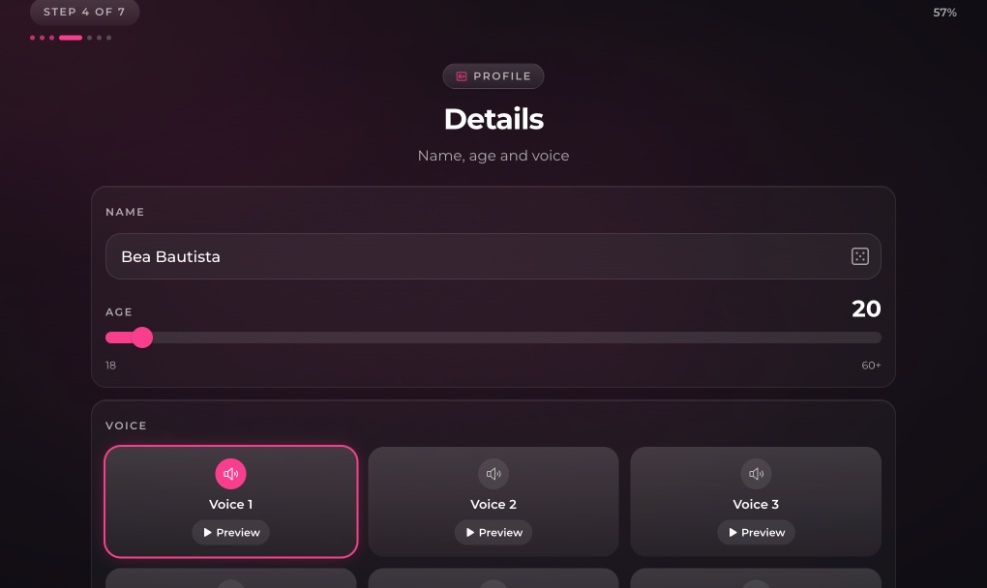
### Details
Her **name**, **age** (18 or older) and **voice**. Preview the voices before you pick one. Click the dice to suggest another name.
{% endstep %}
{% step %}
### Personality & background
Pick as many personality traits as you like, then her relationship to you, her job and her hobbies.
{% endstep %}
{% step %}
### Opening scene
The scenario you meet in and her first message. Both are optional: write them yourself, click **Suggest for me**, or leave them blank and we'll write them for you.
{% endstep %}
{% step %}
### Review
Check everything, choose whether she's public or private, and click **Create Doll**.
{% endstep %}
{% endstepper %}
## Name rules
* 2 to 40 characters: letters, spaces, apostrophes and hyphens.
* A name can't be a role like *Mom* or *Sister*. Put the relationship in the relationship or opening scene instead.
* Public characters need a name nobody else's public character uses. If it's taken, roll the dice for a fresh one.
## Public or private
| | Public (default) | Private |
| -------------------------- | ---------------------- | -------- |
| Who can see her | Everyone on DreamDolls | Only you |
| Who can chat with her | Everyone | Only you |
| Can appear on your profile | Yes | No |
## After you create her
We generate her portrait, bio and welcome message, which takes a little while. If the portrait fails, you'll see **Try again** on her profile; retrying is free.
Later you can pick up to **nine** of your images of her for her profile carousel with **Edit gallery**.
Can I edit or delete a character?
Not yet. Apart from her gallery, a character can't be changed after creation. Contact support if you need a character removed.
---
# Agent Instructions
This documentation is published with GitBook. GitBook is the documentation platform designed so that both humans and AI agents can read, navigate, and reason over technical content effectively. Learn more at gitbook.com.
## Querying This Documentation
If you need additional information that is not directly available in this page, you can query the documentation by asking a question.
Perform an HTTP GET request on the following URL with the `ask` and `goal` query parameters:
```
GET https://dreamdolls.gitbook.io/help/create/creating-a-character.md?ask=&goal=
```
`ask` is the immediate question: it should be specific, self-contained, and written in natural language.
`goal` is what the user is ultimately trying to achieve, the reason they need the answer. Sharing it helps GitBook give you a better, more relevant answer. A goal is most helpful when it describes the outcome the user wants rather than restating the question. For example, with `ask=how do I create an API token`, a goal like `automate deployments from our CI pipeline` lets GitBook tailor the answer to that use case.
The response will contain a direct answer to the question and relevant excerpts and sources from the documentation.
Use this mechanism when the answer is not explicitly present in the current page, you need clarification or additional context, or you want to retrieve related documentation sections.